Designer-grade animations. In one click
Can’t animate? You don’t have to. Select an object, pick an animation from the list – and your slide looks as if a design studio made it
One-off payment | perpetual licence | PowerPoint for Windows
You want your slides to come alive. You get PowerPoint circa 2007
Animation can guide your audience’s eye and give a presentation real class. Provided someone knows how to do it
Fade and Fly In. Again
Your audience knows PowerPoint’s built-in effects by heart. The slide looks dated, even when the content is great
The Animation Pane is a maze
With Previous, After Previous, delay, duration, smoothing… An hour of clicking for one slide, and it still doesn’t look right
Everything jumps, nothing flows
Motion without a smooth ending looks cheap and distracts from what you are saying
No time to learn
Designers spend years learning animation. Your presentation is due tomorrow morning
60 animations designed for you
We have been animating presentations for companies since 2010. We packed the best effects from our work into an add-in you can use with zero animation skills
A designer’s touch
Every animation was designed by the presente team: well-judged timing, smooth easing and effects you won’t find in PowerPoint’s menus
Seconds, not hours
Select your objects and pick an animation from the list. You’ll animate a whole slide faster than you can make a coffee
No animation skills needed
You don’t need to know about delays or motion paths. Every setting is already built into the animation
Works for every viewer
These are standard PowerPoint animations saved in the file. Anyone you send the presentation to sees them – no add-in required
Watch a whole presentation animated with the add-in
25 slides, 45 different animations from the pack and cascades set with a single button. No manual tweaking in the Animation Pane
Three clicks and your slide is animated
- 1
Select objects
Text, a shape, a photo, an icon – one object or several at once
- 2
Pick an animation
Animations tab → My Animations → click one of the 60 animations on the list
- 3
Set the order in one click
AUTO LEFT, AUTO RIGHT or SELECT: objects come in one after another every 0.1 s – from the left, from the right or in your own order

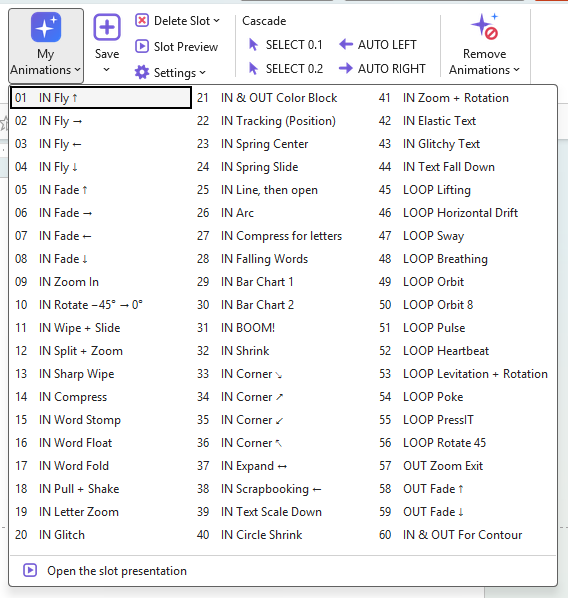
60 animations for every occasion
entrances
From elegant slide-ins and zooms to word and letter effects: Word Stomp, Letter Zoom, Glitch, Spring, Scrapbooking, growing chart bars
loops
Subtle motion that keeps the slide alive while you talk: Breathing, Orbit, Heartbeat, Levitation, Sway
exits
Zoom Exit plus Fade up and down – so objects leave as well as they arrive
entrance + exit
Color Block and For Contour: the object enters and exits in a single animation
Plus time-saving tools
- Save your own animation or a whole combination of effects to a free slot and apply it in one click
- Slot Preview: every animation in motion in a single presentation
- Remove Animations: clears animations from the current slide or the whole presentation
- Export and import your animation list – e.g. to move it to a second computer
For anyone who makes presentations but isn’t an animator
The add-in replaces years of animation practice. Designers will love it too – it saves hours of repetitive work
- Marketing and sales
- HR and employer branding
- Trainers and lecturers
- Executives and managers
- Freelancers and agencies
- Students
incl. VAT, one-off payment, no subscription | VAT invoice
Buy nowIncluded
- presente PRO add-in for PowerPoint with a pack of 60 animations
- Perpetual licence – pay once
- Install on 2 computers used by one person
- Updates included
- PDF guide and a digitally signed installer
Requirements: Windows and desktop PowerPoint (Microsoft 365). The add-in does not work on a Mac or in PowerPoint for the web
Questions we hear most often
Do I need to know how to animate?
No. The add-in was made precisely for people who don’t animate. Select an object and pick an animation from the list – all timings, delays and motion curves are already set.
Does the person I send the presentation to need the add-in?
No. The add-in applies standard PowerPoint animations that are saved in the file. Your audience opens the presentation in their own PowerPoint and sees every animation.
Which computers does it run on?
Windows, in desktop PowerPoint (Microsoft 365). The add-in does not work on a Mac or in PowerPoint for the web.
Can I change an animation after applying it?
Yes. The applied animation appears in PowerPoint’s Animation Pane, so you can change its start, delay or duration. Save your favourite settings to the list and reuse them.
How do I get the add-in?
After purchase you receive the installer and a PDF guide. Installation takes a moment and needs no administrator rights. The installer is digitally signed by innovative services Adam Stachowski (owner of the presente design brand).
How many computers can I install it on?
One licence covers one user and up to 2 computers, e.g. at work and at home. The licence is perpetual and updates are included.
How do I pay?
The price is PLN 159 including VAT. Checkout runs on our Polish sales platform (in Polish) – you pay by card online and the platform issues a VAT invoice; you can enter your company details for the invoice when ordering.
I’m buying for a whole team. How does that work?
Licences are per person. For several people, get in touch – we’ll prepare a quote and a company invoice.
Got a question about the add-in?
Write to us – we’ll answer questions about how it works, installation or team licences